
文章 / 公众号历史文章
『JSA宏神助攻之五』使用搭建本地web服务让JSA宏连接本地文件读写
在JSA宏中,没有办法对本地的文件进行读写,虽然仿效VBA实现了一个FreeFile的函数来处理读写,但也仅限于文本文件的读写。 如下代码(接录于WPS Office JavaScript 宏教程(JS宏)): 读取可能还算好,写入很坑的,会将本来的内容,在前后加上了一个单引号,将原本好好的文本给破
在JSA宏中,没有办法对本地的文件进行读写,虽然仿效VBA实现了一个FreeFile的函数来处理读写,但也仅限于文本文件的读写。
如下代码(接录于WPS Office JavaScript 宏教程(JS宏)):
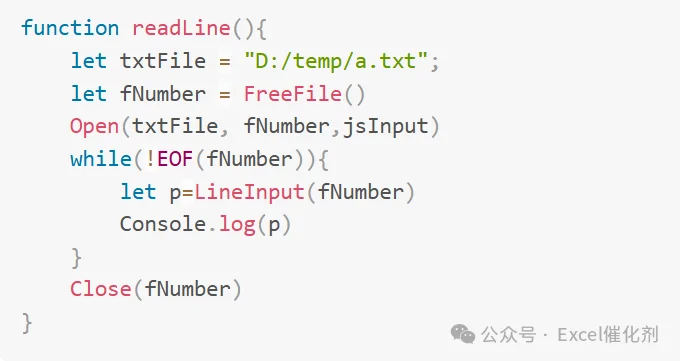
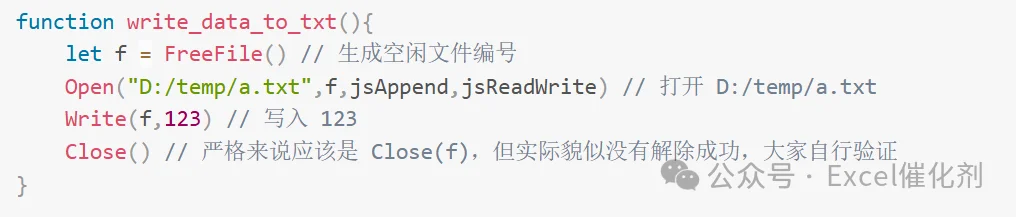
读取可能还算好,写入很坑的,会将本来的内容,在前后加上了一个单引号,将原本好好的文本给破坏了。
在JSA上没有,如何才能创造让它产生有?最有效的方式,就是提供一些外部服务,它来调用就完事了。这样的方式,也是无限扩展JSA宏的能力边界的一种非常有效的手段。
这些外部服务,最简单的,就是给它一个web服务来调用,当然可以自己架设个服务器来部署个web api服务,供JSA使用xmlhttpRequest或fetch来访问。
如果要在极端环境下使用,并且想调用本地资源,那就只有在本地电脑上搭建一个web服务就算事了。
如何搭建这个web服务,可能各路编程神仙又跑出来说用python/nodejs/r等各种方式搭建最方便啦,几句代码就立马开启了一个web服务。这个方便确实是方便,只是对开发者方便,对用户端,也不会太方便,单单满足有各种语言的运行环境就足够头大,就算打包整个环境到用户机器上使用,也是庞然大物。
既然是windows环境,除了.NET,谁还敢来称说比它容易的事。所以gpt时代,理当最合适的语言做最合适的事情。用.NET来搭建这个本地web服务准没错了。
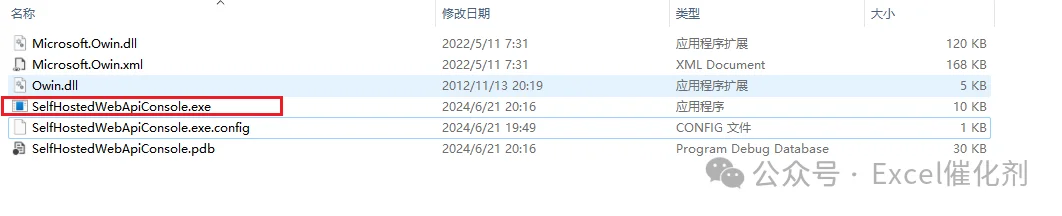
在C#里,有个启动 OWIN 自托管的 Web API 服务,不用部署IIS,直接双击exe就开启了一个web 服务。代码也不复杂,毕竟是gpt吧,直接叫它写就完事了。具体的代码直接贴上,照抄来改进即可。
using System;using System.Collections.Specialized;using System.IO;using System.Net;using System.Text;using System.Threading;using System.Threading.Tasks;using System.Web;
namespace SelfHostedWebApiConsole{    class Program    {        private static HttpListener _listener;        private static readonly string _url = $"http://localhost:{Properties.Settings.Default.WebApiPort}/";
        static void Main(string[] args)        {            StartServer();
            while (_listener.IsListening) // Loop to keep the main thread running while the listener is active.            {                Thread.Sleep(1000);            }        }
        public static void StartServer()        {            _listener = new HttpListener();            _listener.Prefixes.Add(_url);            _listener.Start();
            Console.WriteLine("Listening for connections on {0}", _url);
            Task.Run(() =>            {                while (_listener.IsListening)                {                    try                    {                        var context = _listener.GetContext();                        ProcessRequest(context);                    }                    catch (HttpListenerException)                    {                        // This will occur on _listener.Stop()                        break;                    }                }            });        }
        public static void StopServer()        {            if (_listener != null)            {                _listener.Stop();                _listener.Close();            }        }
        private static void ProcessRequest(HttpListenerContext context)        {            var request = context.Request;            var response = context.Response;
            try            {                switch (request.Url.AbsolutePath)                {                    case "/api/file/read":                        ProcessFileRead(request, response);                        break;                    case "/api/file/write":                        ProcessFileWrite(request, response);                        break;                    default:                        response.StatusCode = (int)HttpStatusCode.NotFound;                        break;                }            }            finally            {                response.OutputStream.Close();            }        }
        private static void ProcessFileRead(HttpListenerRequest request, HttpListenerResponse response)        {            string filePath = GetFilePath(request);            filePath = HttpUtility.UrlDecode(filePath, System.Text.Encoding.UTF8);            var isBinary = bool.Parse(request.QueryString["isBinary"] ?? "false");            var encodingName = request.QueryString["encoding"] ?? "utf-8"; // 默认为 UTF-8

            if (!File.Exists(filePath))            {                response.StatusCode = (int)HttpStatusCode.NotFound;                return;            }
            if (isBinary)            {                var fileBytes = File.ReadAllBytes(filePath);                response.ContentType = "application/octet-stream";                response.OutputStream.Write(fileBytes, 0, fileBytes.Length);            }            else            {                Encoding encoding;                try                {                    encoding = Encoding.GetEncoding(encodingName);                }                catch (ArgumentException)                {                    response.StatusCode = (int)HttpStatusCode.BadRequest;                    var errorMessage = Encoding.UTF8.GetBytes("Invalid encoding specified.");                    response.OutputStream.Write(errorMessage, 0, errorMessage.Length);                    return;                }
                var fileContent = File.ReadAllText(filePath, encoding);                var buffer = Encoding.UTF8.GetBytes(fileContent);                response.ContentType = "text/plain; charset=utf-8";                response.OutputStream.Write(buffer, 0, buffer.Length);            }
            response.StatusCode = (int)HttpStatusCode.OK;        }
        private static string GetFilePath(HttpListenerRequest request)        {            string rawUrl = request.RawUrl;            Uri uri = new Uri("http://dummy" + rawUrl); // 加前缀是因为Uri需要完整的格式
            // 解析查询字符串            NameValueCollection queryParameters = HttpUtility.ParseQueryString(uri.Query);            string encodedFilePath = queryParameters["filePath"];            if (!string.IsNullOrEmpty(encodedFilePath))            {                string decodedFilePath = Uri.UnescapeDataString(encodedFilePath);                return Environment.ExpandEnvironmentVariables(decodedFilePath);            }            else            {                return string.Empty;            }
        }
        private static void ProcessFileWrite(HttpListenerRequest request, HttpListenerResponse response)        {            string filePath = GetFilePath(request);            var isBinary = bool.Parse(request.QueryString["isBinary"] ?? "false");            var encodingName = request.QueryString["encoding"] ?? "utf-8"; // 默认为 UTF-8
            try            {                Encoding encoding = Encoding.GetEncoding(encodingName);                if (isBinary)                {                    // 二进制模式,直接从流中读取并写入文件                    using (var fs = new FileStream(filePath, FileMode.Create, FileAccess.Write))                    {                        request.InputStream.CopyTo(fs);                    }                }                else                {                    // 文本模式,使用指定的编码读取文本内容并写入文件                    using (var reader = new StreamReader(request.InputStream, encoding))                    {                        var content = reader.ReadToEnd();                        File.WriteAllText(filePath, content, encoding);  // 使用提供的编码写入文件                    }                }                response.StatusCode = (int)HttpStatusCode.OK;                var responseMessage = "File written successfully";                var responseBuffer = Encoding.UTF8.GetBytes(responseMessage);                response.OutputStream.Write(responseBuffer, 0, responseBuffer.Length);            }            catch (ArgumentException)            {                // 编码不支持或无效                response.StatusCode = (int)HttpStatusCode.BadRequest;                var errorMessage = Encoding.UTF8.GetBytes("Invalid encoding specified.");                response.OutputStream.Write(errorMessage, 0, errorMessage.Length);            }        }

    }}
有了这个读写文件的接口,在JSA上,直接调用这个本地接口就完事了,也送上JSA的代码段:
async function testTextFileOperations() {    // 定义读取和写入的文件名及其他参数    const readFileName = 'C:/Users/19026/Desktop/测试文本.txt';    const writeFileName = 'C:/Users/19026/Desktop/测试文本写入.txt';    const isBinary = false; // 明确指定处理非二进制(文本)文件
    // 构建读取请求的URL    const readUrl = `http://localhost:6789/api/file/read?filePath=${encodeURIComponent(readFileName)}&isBinary=${isBinary}`;
    try {        // 使用fetch读取文本文件        const readResponse = await fetch(readUrl);        if (!readResponse.ok) {            throw new Error('Failed to read file: ' + await readResponse.text());        }        const textContent = await readResponse.text();        console.log('File read successfully:', textContent);
        // 可以在此处修改textContent,例如添加一些文本        const modifiedContent = textContent + "\nAdditional line added by the script.";
        // 第二步:将修改后的文本内容写入另一个文件        const writeUrl = `http://localhost:6789/api/file/write?filePath=${encodeURIComponent(writeFileName)}&isBinary=${isBinary}`;
        // 使用fetch写入文本文件        const writeResponse = await fetch(writeUrl, {            method: 'POST',            headers: {                'Content-Type': 'text/plain; charset=utf-8'            },            body: modifiedContent        });
        if (!writeResponse.ok) {            throw new Error('Failed to write file: ' + await writeResponse.text());        }        console.log('File written successfully');    } catch (error) {        console.error('Error:', error);    }}
笔者本来接口实现的是读取文件,可以是二进制,也可以是文本,遗憾的是二进制文件的读写,在JSA上失败了,还在找官方问原因,希望未来可以修复吧。
最后,在JSA中,使用Shell函数,来启用这个本地Web服务,启用完后,就可以使用http请求的方式,进行get/post请求,访问上面的读写文件的接口了(WPS最新版本竟然又有bug,这个Shell函数用不了!!!等他们修复好再尝试吧,先手动双击下exe运行测试)。

总结
现在的程序交互中,大量使用了web服务来作为程序间交互通信的手段。一般很少会自己和自己玩,在本地建立个web服务来访问。
但因为WPS的弱鸡性,只能用各种方式来增强它,使用web服务,是个不错的选择,特别是JSA现在原生支持发起http请求。
在web服务的搭建上,强烈建议使用.NET来完成,简单快捷,发布时的文件足够小,充分利用windows的现有环境跑起来(其他语言来搭建单单在用户机器上弄个环境头都大)。
欢迎持续关注本号给大家探索出的高能黑科技。也欢迎有RPA/BI/OFFICE二次开发等企业项目数据需求的,找笔者来定制支持,笔者将使用所积攒的各种技术给您交付一个高质量的解决方案。